EVE-NG CCIE Security Lab with DNA Center
CCIE, CCNP, Security Exam & Workbooks
EVE-NG CCIE Security Pack is an OVA with built-in images and workbooks, so you don’t need to manually install or pay for anything. You just need to download, extract, and install the ready-made OVA pack, and you are good to go. The great thing about this product is that most of the images from Cisco DNA Center, Cisco ASA, Cisco ISE, FirePower, Cisco CSR 1000v, and Cisco WEB/EMAIL Security Appliance (WSA.ESA) are included. It is a valuable resource for network professionals seeking to strengthen their understanding of network security and improve their overall skillset in this domain
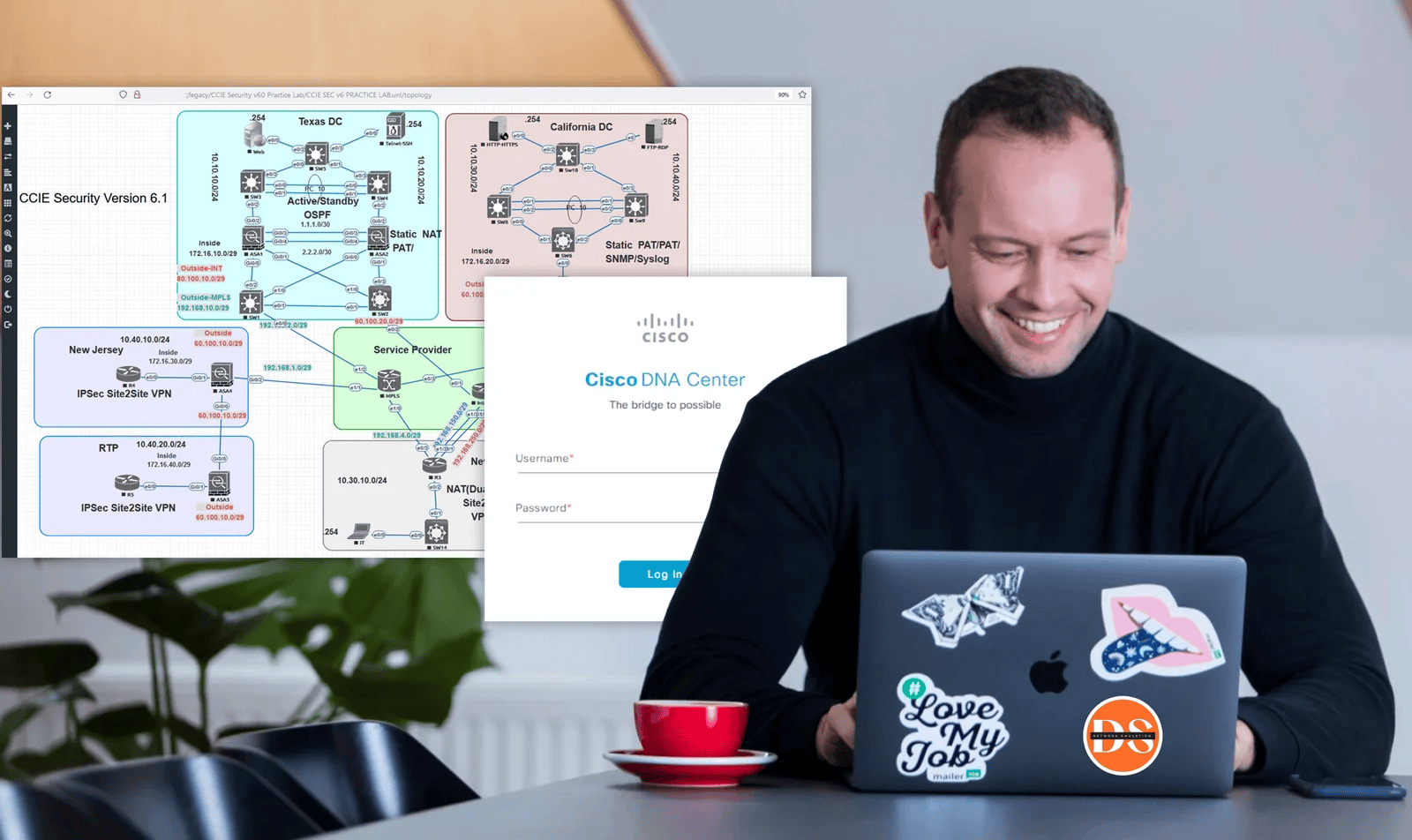

This is a wonderful pack that I was trying to make by myself but struggled a few times and I was so happy to find this website, it’s easy to deploy and you have a complete CCIE security lab.
- Mike Toller
Stop Feeling Overwhelmed by CCIE Security: Succeed with Our Comprehensive Training Pack
As you’re well aware, mastering the complexities of CCIE Security is crucial for advancing in the world of network security—a field that demands both deep knowledge and practical expertise.
You’ve heard the success stories, you’ve seen the statistics, and you understand the critical role that CCIE certification plays in securing top-tier security roles…and yet…
…if you’re anything like most aspiring network professionals, you probably find yourself overwhelmed by the vast syllabus, grappling with high-level concepts, or worse – postponing your study sessions entirely.a
The Challenge of Mastering CCIE Security
Enter the Ultimate CCIE Security Pack: Your Shortcut to Mastery in Network Security
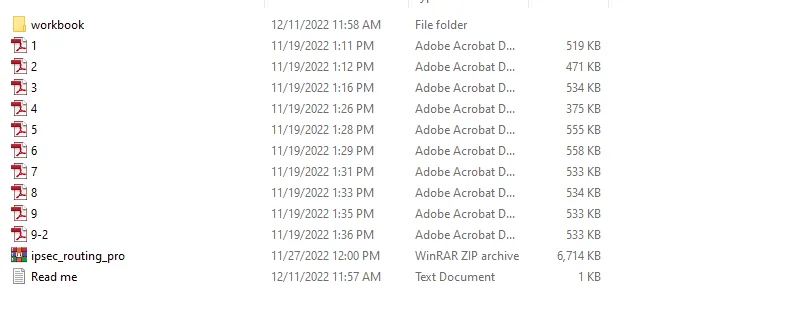
By providing a pre-configured Ova eve-ng file, including scenarios and ready-to-use images. Just download, extract, and install to jumpstart your practice.
Here's how it works:
What's Included in Your CCIE Security Pack?
Transform Your CCIE Security Exam Preparation with Our Comprehensive Training Pack
The EVE-NG CCIE Security Lab with DNA Center is a meticulously crafted package that includes a wide array of pre-installed nodes and images, ensuring you can jump straight into a hands-on networking experience. This collection is designed for those who want to focus on learning and practice without the hassle of installation and setup.
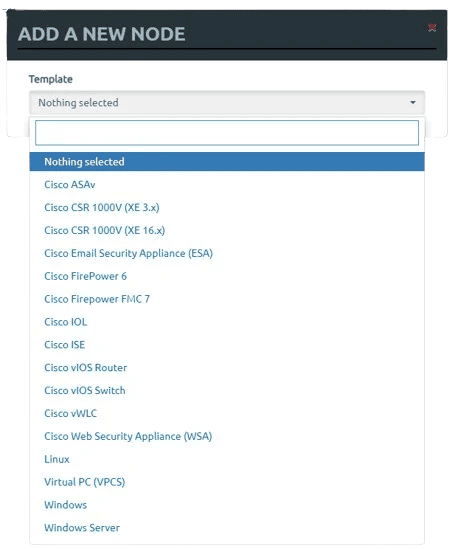
- Cisco ASA Firewall: Multiple versions including asav-910-1-2, asav-910-1-32, asav-9-15-1, and asav-9-16-2-3
- Cisco Web Security Appliance (WSA): coeus-12-0-1
- Cisco Email Security Appliance (ESA): phoebe-12-5-0
- Cisco CSR 10000 Router: Versions csr1000vng-universalk9.16.06.03 and csr1000vnguniversalk 9.15.04
- Linux OS: Including Linux Kali
- vWLC: vwlc-8.3.1
- Cisco IOSv L3 and L2 (VIRL): vios-adventerprisek9-m.SPA.159-3.M4 and viosl2-adventerprisek9-m.ssa.high_iron_20190423
- Windows: Windows Server 2019 and Windows 10
New Update v6.1 👇
- Cisco FirePower: FTD 6.3, FMC 7.1 & 6.3, and NGIPS versions 7
- Cisco DNA Center: Version 2.1.2.7 (needed to be installed as a VM)
- Cisco AnyConnect: Version 4.9
- Cisco ISE: Version 3.1Version 3.1
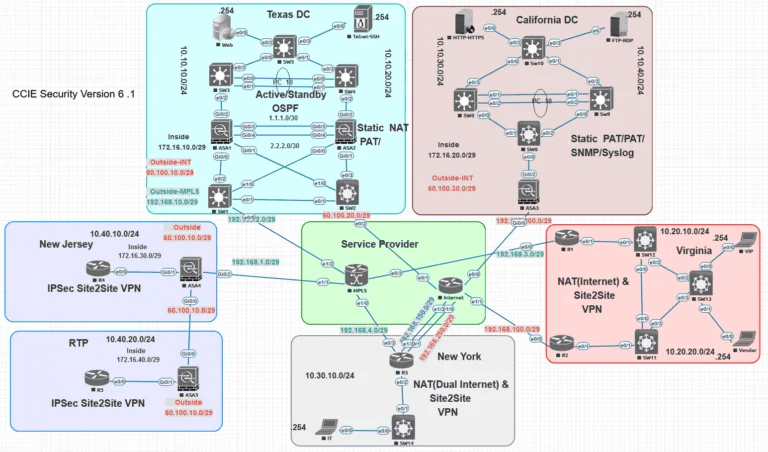
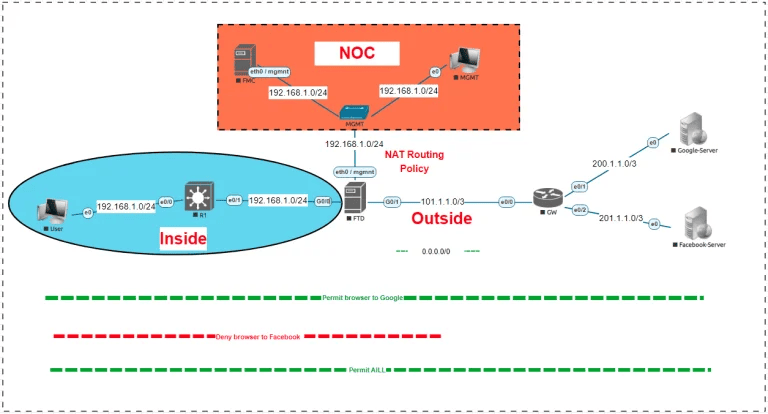
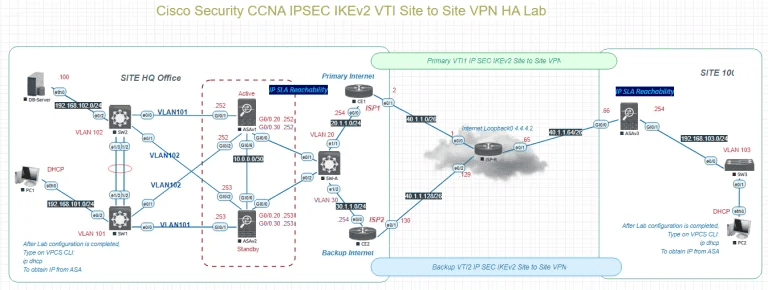
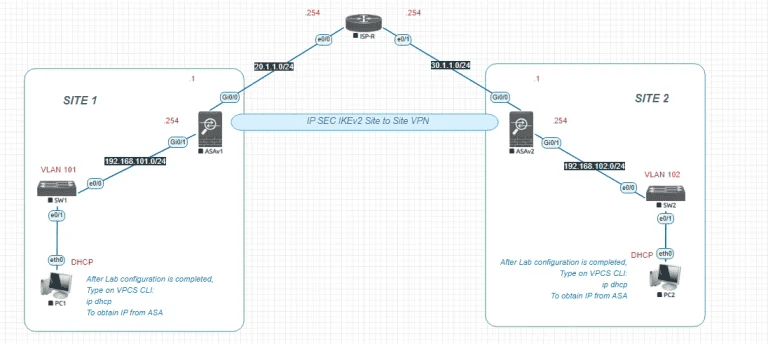
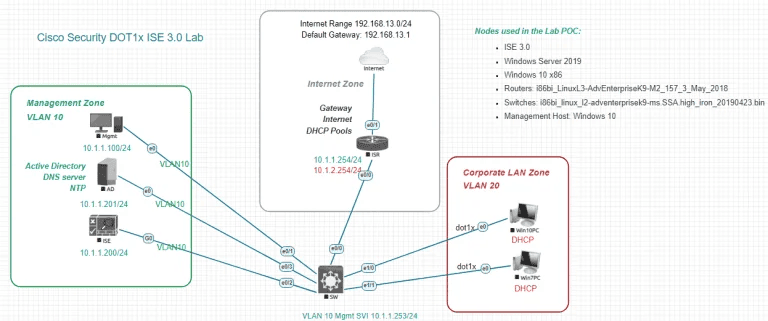
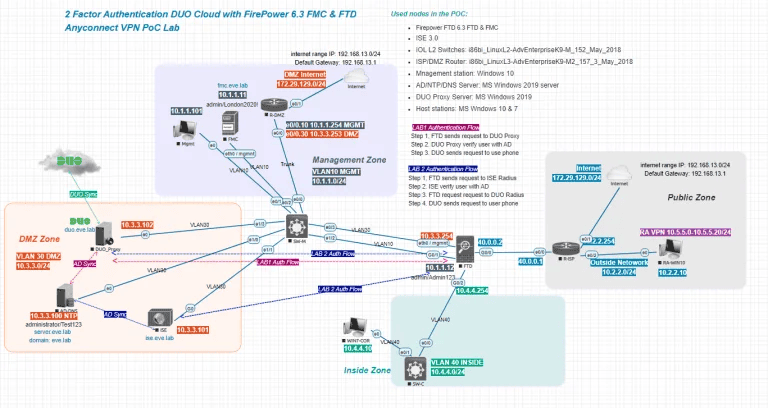
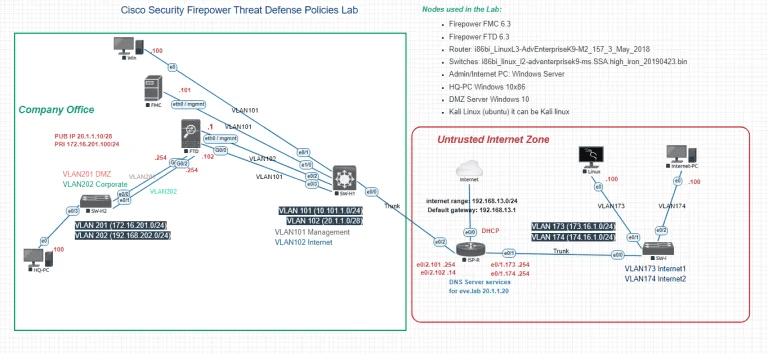
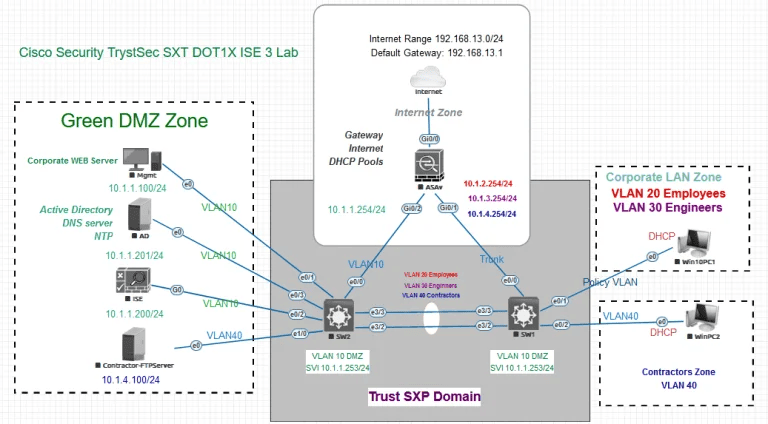
19 Real-life Scenarios for Cisco Security and CCIE Security v6.1
What Images Are Installed On
EVE-NG CCIE Security Pack?
A Summary Of The Licenses
For Each Virtual Appliance
Now’s The Time To Act!
Ready to Explore and Download
the EVE-NG CCIE Security with DNA Center?


Your EVE-NG CCIE Enterprise Lab
How to Access
To get EVE-NG CCIE LABs Security Pack, you have to follow these steps:
1.Buy Now
2.Checkout
Download & Access
Premium Support
Supporting You Every Step of the Way
We are here to support you every step of the way. You’ll get Premium Support from a highly trained team of professionals who are ready to answer questions via email or live chat 24/7.

FAQ
Have more questions?
If you’ve got any questions about the CCIE Security Lab, or need a hand with anything else, we’re just an email away.
Have more questions?
If you’ve got any questions about the CCIE Security Lab, or need a hand with anything else, we’re just an email away.
What's included in the package?
CCIE Security Lab (OVA) and DNA Center ISO, which both needed to be installed as a VM in your system
CCIE Security Lab (OVA) and DNA Center ISO, which both needed to be installed as a VM in your system
Are the images licensed?
Yes, all the images have a trial period and after expiration, you can simply remove the expired node and add it again. (can be replaced)
Yes, all the images have a trial period and after expiration, you can simply remove the expired node and add it again. (can be replaced)
EVE-NG CCIE Security Pack system requirements?
To run the CCIE Security lab, you need 64 GB memory, 10 VCPU, and a 100 GB SSD disk, which can be installed on a VMware Workstation or an ESXi. To install Cisco DNA Center as a VM, you need an ESXi Server with 96 GB of Memory and 10 vCPU; these are the minimum resources.
To run the CCIE Security lab, you need 64 GB memory, 10 VCPU, and a 100 GB SSD disk, which can be installed on a VMware Workstation or an ESXi. To install Cisco DNA Center as a VM, you need an ESXi Server with 96 GB of Memory and 10 vCPU; these are the minimum resources.
What Nodes or images are installed in this package?
This is included in most of the images from Cisco DNA Center, Cisco ISE, Cisco Viptela SD-WAN images, Cisco CSR 1000v, Cisco CSR 8000v, Windows Server, Linux Host VM, and IOSv images. It’s included with excellent four premade ready LABs. It has 16 ideal images for CCNP and CCIE Enterprise. Images for this product.
This is included in most of the images from Cisco DNA Center, Cisco ISE, Cisco Viptela SD-WAN images, Cisco CSR 1000v, Cisco CSR 8000v, Windows Server, Linux Host VM, and IOSv images. It’s included with excellent four premade ready LABs. It has 16 ideal images for CCNP and CCIE Enterprise. Images for this product.
How much resources do i need to install DNA Center?
96 GB of Memory and 10 vCPU its a minimum resources.
96 GB of Memory and 10 vCPU its a minimum resources.
How to connect the DNA Center server to CCIE Enterprise Lab?
You need to install EVE-NG Enterprise (OVA) in your VMware Workstation Player/Pro or an ESXi. Then, you must install DNA Center as a VM in an ESXi server and connect the DNA Center server to your lab with the management network (cloud0) in eve-ng.
You need to install EVE-NG Enterprise (OVA) in your VMware Workstation Player/Pro or an ESXi. Then, you must install DNA Center as a VM in an ESXi server and connect the DNA Center server to your lab with the management network (cloud0) in eve-ng.
Is EVE-NG CCIE Security Pack an official EVE-NG?
Yes, we just add images and labs sparing you the hassle of manual installation or lab creation.
Yes, we just add images and labs sparing you the hassle of manual installation or lab creation.
Do i need a licence to active Dna Center?
No license is needed, and a 90-day trial is available to practice all features. After expiration, you can remove the expired DNA center VM and install it again to practice for 90 days.
No license is needed, and a 90-day trial is available to practice all features. After expiration, you can remove the expired DNA center VM and install it again to practice for 90 days.
Can I start the LAB without DNA Center?
Yes, You can practice CCIE Enterprise lab without needing the DNA Center server.
Yes, You can practice CCIE Enterprise lab without needing the DNA Center server.
How to install Cisco DNA Center in ESXi?
This is a video that shows you how to install Cisco DNA Center on a virtual machine using VMware ESXi (Click here). The video covers the installation process from downloading the Cisco DNA Center ISO image to completing the Quick Start workflow.
This is a video that shows you how to install Cisco DNA Center on a virtual machine using VMware ESXi (Click here). The video covers the installation process from downloading the Cisco DNA Center ISO image to completing the Quick Start workflow.
What if i don't like your product?
We highly encourage you to read the FAQs, product descriptions, and reviews before you buy. We only provide refunds when we cannot give you the services defined or Committed. If you have any technical problems with our EVE-NG Enterprise Pack, we will do our best to fix them ASAP. If we fail to fix the problem and cannot provide you with the requested service in the committed time frame (which is highly unlikely), a 100% refund will be made to you. If you have used more than Three days on the product, there are no refunds for non-service issues.
We highly encourage you to read the FAQs, product descriptions, and reviews before you buy. We only provide refunds when we cannot give you the services defined or Committed. If you have any technical problems with our EVE-NG Enterprise Pack, we will do our best to fix them ASAP. If we fail to fix the problem and cannot provide you with the requested service in the committed time frame (which is highly unlikely), a 100% refund will be made to you. If you have used more than Three days on the product, there are no refunds for non-service issues.